Dataset Examples
ZEN-garden provides a number of small datasets to demonstrate the
functionalities of ZEN-garden and to understand the data structure. The datasets
are stored in the datasets directory of the ZEN-garden repository. If you
forked the ZEN-garden repository, you can find the datasets in the
documentation/dataset_examples directory. If you installed ZEN-garden using
pip, you can download and execute the datasets with the --downlaod-example
flag (see Using dataset examples).
The following datasets are available:
1_base_case2_multi_year_optimization3_reduced_import_availability4_PWA_nonlinear_capex5_multiple_time_steps_per_year6_reduced_import_availability_yearly7_time_series_aggregation8_yearly_variation9_myopic_foresight10_brown_field11_multi_scenario12_multiple_in_output_carriers_conversion13_yearly_interpolation14_retrofitting_and_fuel_substitution15_unit_consistency_expected_error
All datasets build upon the dataset 1_base_case and extend it with
additional features. In the following we describe the datasets and highlight the
differences to the previous dataset.
1_base_case
The base case includes a simple energy system consisting of two nodes:
Switzerland (CH) and Germany (DE). Although more nodes are defined in the
set_nodes.csv file, only CH and DE are selected in system.json.
A single year optimization fulfils the heat and electricity demands in both
nodes. To fulfil the demands, the energy system can install and use the
following technologies:
Name |
Technology type |
Description |
|---|---|---|
Natural gas boiler |
Conversion |
Converts natural gas to heat |
Photovoltaics |
Conversion |
Generates electricity |
Natural gas storage |
Storage |
Stores natural gas |
Natural gas pipeline |
Transport |
Transports natural gas between nodes |
Resulting from the technologies, the model requires the energy carriers heat, electricity, and natural gas. As only natural gas boilers can produce heat in this example, the optimal solution builds the boilers in both nodes to fulfil the heat demand. In both nodes, photovoltaic systems generate the required electricity. Natural gas pipeline and storage are not installed as the natural gas can be imported in both nodes without limits.
2_multi_year_optimization
The model builds upon the base case by extending the optimization over multiple
years. The parameter optimized_years in the system.json file defines the
number of years to optimize. Additionally, the optimization only runs for every
second year, thus, aggregating two years in each optimized year. This setting
can be controlled with the interval_between_years parameter in the
system.json file. The heat demand in both nodes is variable over the years
and the optimization model must fulfil them in all years. The adjusted heat
demand is specified in the demand.csv file of the heat folder.
3_reduced_import_availability
The example is identical to 2_multi_year_optimization, but with reduced
import availability of natural gas in DE (see the file
availability_import.csv). The reduced import availability forces the model
to install natural gas pipelines to transport the missing natural gas from CH to
DE. Additionally in this model, natural gas pipeline capital expenditures
consist of two parts, which are independent: distance dependent costs
(capex_per_distance_transport) and capacity dependent costs
(capex_specific_transport). These costs are specified independently from
each other in the attributes.json file. Note that the units of
capex_per_distance_transport need to be specified as costs per distance
without taking into account the capacity. The distance dependent costs depend on
a binary decision whether the connection is installed or not, while the capacity
dependent costs are linearly dependent on the installed capacity. Consequently,
the model is a mixed integer linear program. This method for calculating the
costs of transport modes needs to be activated in the system.json file by
setting the parameter double_capex_transport to true.
4_PWA_nonlinear_capex
In this example, the nonlinear CAPEX for conversion technologies is introduced.
The model is the same as 3_reduced_import_availability, but with piecewise
approximation of the capital cost function for natural gas boiler. The file
nonlinear_capex.csv in the natural gas boiler folder contains breakpoints
of the piecewise approximation and the specific CAPEX at the respective
breakpoints:
capacity_addition |
capex_specific_conversion |
|---|---|
0 |
2000 |
40 |
1500 |
80 |
1200 |
120 |
1010 |
160 |
890 |
200 |
840 |
GW |
Euro/kW |
As soon as ZEN-garden detects a nonlinear_capex.csv file, the piecewise
approximation is enabled. Consequently, the model becomes a mixed integer linear
program due to the binary variables required for the piecewise approximation.
Heat pumps are introduced as new technology and the optimizer can now choose
between two technologies to fulfil the heat demand. The heat pump technology has
a linear CAPEX function. Due to the higher CAPEX for smaller installations of
natural gas boilers, the heat pump is the cost-optimal choice for the node with
a smaller heat demand (CH).
5_multiple_time_steps_per_year
Now the model includes time steps within a year and optimizes the operation of
the energy system. In the system.json file the parameters
aggregated_time_steps_per_year and unaggregated_time_steps_per_year are
set to 96. This equals looking at the first 96 hours of the year. In order to
include variation between the time steps, the electricity and heat demands are
hourly resolved in the demand.csv file.
6_reduced_import_availability_yearly
With the file availability_import_yearly.csv the import availability of
natural gas in CH is step-wise reduced for each year. In contrast to
the availability_import.csv file, the availability_import_yearly.csv
file specifies the limit for the entire year and not for individual time steps.
As a consequence of the import restrictions, the solution contains natural gas
storage and pipelines to store natural gas for the years with a smaller import
limit.
7_time_series_aggregation
Now the time series aggregation is switched on in the system.json file by
setting the parameter conduct_time_series_aggregation to true.
Additionally, the parameter aggregated_time_steps_per_year needs to be
smaller than the unaggregated_time_steps_per_year. In this example, 96 time
steps are aggregated to 10 representative time steps. For illustration purposes,
the availability_import_yearly.csv file of natural gas is structured
differently to the previous examples:
node |
2023 |
2024 |
2025 |
|---|---|---|---|
CH |
inf |
80 |
40 |
The years are now set as the columns of the file and the nodes as the rows. Both structures are supported in ZEN-garden and depending on the input data, one might be easier to handle than the other.
8_yearly_variation
In addition to the variation within a year, ZEN-garden’s input data can also
handle variation between years. The yearly variation multiplies a parameter with
a constant factor for the entire year. Consequently, the shape of the input data
is the same for each year, but the scale is different. In this example, the
price of natural gas and the electricity demand are varied between the years.
For natural gas, the file price_import_yearly_variation.csv contains the
factor to for each year. The factors for the electricity demand are stored in
the file demand_yearly_variation.csv. For example, the factor for
electricity demand in DE in year 2029 is 1.2. The electricity demand of each
hour is, therefore, multiplied with the factor 1.2 for the entire year 2029
leading to a proportional increase of the electricity demand. Additionally, the
example optimizes the full year instead of only the first 96 hours. The
parameter unaggregated_time_steps_per_year is set to 8760 in the
system.json file. However, the time series aggregation is still active and
the optimization uses 10 representative time steps for the entire year.
9_myopic_foresight
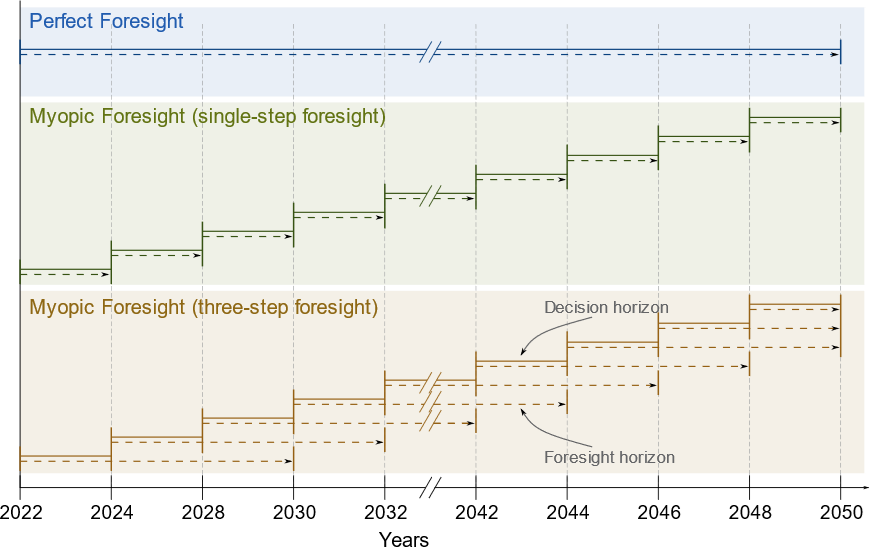
All the previous datasets are optimized using so-called perfect foresight, i.e.,
all years are optimized at once with the assumption that all the future
parameter data are known at the time the optimization is conducted. In this
example, however, myopic foresight is demonstrated, where the knowledge of
future parameter data, the foresight horizon, is limited. To activate this
feature, the parameter use_rolling_horizon in the system.json file is
set to true. Simultaneously, the years_in_rolling_horizon parameter
needs to be specified to set the length of the foresight horizon. In this
example, the foresight horizon is set to 1.
The difference between perfect and myopic foresight is illustrated in the following figure, where the lengths of the decision horizon and the foresight horizon are visualized:
10_brown_field
Up to this model, all examples have assumed so-called green field capacity
expansion. The assumption is that all capacities are newly built and no
capacities are existing on nodes or edges, i.e., the whole system is built
from scratch. In this model, the brown field capacity expansion is introduced.
Brown field capacity expansion means that some capacities already exist and have
to be considered in the optimization. ZEN-garden supports existing capacities
that are built in the past, i.e., can be used immediately and have a reduced
lifetime left. Additionally, capacities that will be built in the future, i.e.
within the optimization horizon, can be considered. For example, this may cover
installations for which the decision to build them has already been made, but
the construction has not yet started. The model 10_brown_field builds upon
the example 8_yearly_variation, i.e., with perfect foresight optimization.
For photovoltaic systems, the file existing_capacities.csv is added which
specifies the capacities that exist in the nodes and the year in which they
were or will be built.
11_multi_scenario
The model 11_multi_scenario showcases the scenario analysis feature of
ZEN-garden. The parameter conduct_scenario_analysis in the system.json
file is set to true and a new file, scenarios.json, is added to the
dataset. The file scenarios.json contains the different scenarios that are
considered in the optimization. In the example, all supported ways of
manipulating the input data are demonstrated. Additional files are added to the
dataset which are used by the different scenarios: different carbon prices and
a new attributes file for electricity. The files which are to be used by the
scenario analysis must have an additional ending in the file name to distinguish
them from the standard input data files. The ending is specified in the
scenarios.json file. For example, the alternative attributes file for
electricity is named attributes_low_carbon.json.
12_multiple_in_output_carriers_conversion
This model introduces conversion technologies which work with more than one in-
or output carrier. For this purpose, the model from example
8_yearly_variation is extended with a combined heat and power (CHP)
technology. The CHP technology replaces the natural gas boiler and works with
natural gas and biogas as input carriers. The carrier biogas is newly introduced
as well. The output carriers of the CHP plant are heat and electricity. The
ratio in which the CHP plant uses natural gas/biogas and produces
heat/electricity is specified with the conversion_factor parameter of the
CHP plant. The respective parameter in the attributes.json file of the CHP
plant is specified as:
"conversion_factor": {
    "heat": {
        "default_value": 1.257,
        "unit": "GWh/GWh"
    },
    "natural_gas": {
        "default_value": 1.427,
        "unit": "GWh/GWh"
    },
    "bio_gas": {
        "default_value": 1.427,
        "unit": "GWh/GWh"
    }
}
13_yearly_interpolation
This example showcases how missing values in input data can be interpolated and
how the interpolation can be switched off. Compared to the previous example, an
annual limit of carbon emissions is introduced (file
carbon_emissions_annual_limit.csv). Each of the parameters
carbon_emissions_annual_limit and price_carbon_emissions have yearly
values missing. Per default, ZEN-garden interpolates the missing values linearly
between the two closest known values. If this behaviour is not wanted, parameter
names can be added to the file parameters_interpolation_off.json inside the
energy_system folder. For the parameter names in this file, the
interpolation of missing values is switched off. In this case, the default value
from the attributes.json file is used for the missing values.
14_retrofitting_and_fuel_substitution
In this example, the concept of retrofit technologies is introduced. Retrofit
technologies are technologies that can be added to existing technologies to
change their input or output carriers. By changing the input carrier of a
technology, the model can substitute the fuel originally used by the technology
with another fuel. In this example, the CHP plant can be retrofitted to use
e-fuel instead of natural gas. This is done with the newly added technology
e_fuel_production which takes electricity as input and produces natural gas.
Another retrofit technology is the carbon_capture technology which can be
added to the CHP plant to capture the carbon emissions. It requires electricity
as input and produces carbon which is then stored permanents with another added
technology: carbon_storage.
Since the retrofit technology can only be added to a specific conversion
technology, it requires an additional parameter in the attributes.json file:
"retrofit_flow_coupling_factor": {
    "base_technology": "CHP_plant",
    "default_value": 0.18,
    "unit": "kilotons/GWh"
}
The retrofit_flow_coupling_factor specifies to which technology the retrofit
technology can be added and the coupling factor between the retrofit and the
base technology. The retrofit technologies belong to a new technology set:
set_retrofitting_technologies, which must be specified in the
system.json file. The set retrofitting technologies is a child of the
conversion technologies and, therefore, the folder for carbon_capture and
e_fuel_production must be places inside the folder
set_conversion_technologies. Since carbon_capture and carbon_storage
require carbon as an input/output carrier, carbon is included in the
dataset.
15_unit_consistency_expected_error
The example should illustrate the ZEN-garden response in case the input data is
faulty. Specifically, ZEN-garden checks whether the units of the input data are
consistent between technologies and carriers. In the example, several units of
the carrier natural_gas and the technology natural_gas_pipeline are
changed from an energy-based unit (GWh) to a mass-based unit (tons). When
running the example, ZEN-garden will raise an error due to the unit
inconsistency.